
Overview
Each sellable line on GetYourGuide must point at the correct line in Go Shalabi. The link is the GYG product ID string you copy from your package Options and paste into GetYourGuide when you map the product.
What you need
- Access to Go Shalabi admin for your packages.
- Access to the GetYourGuide supplier portal to edit product mapping.
Product code — where to find it & how it is used
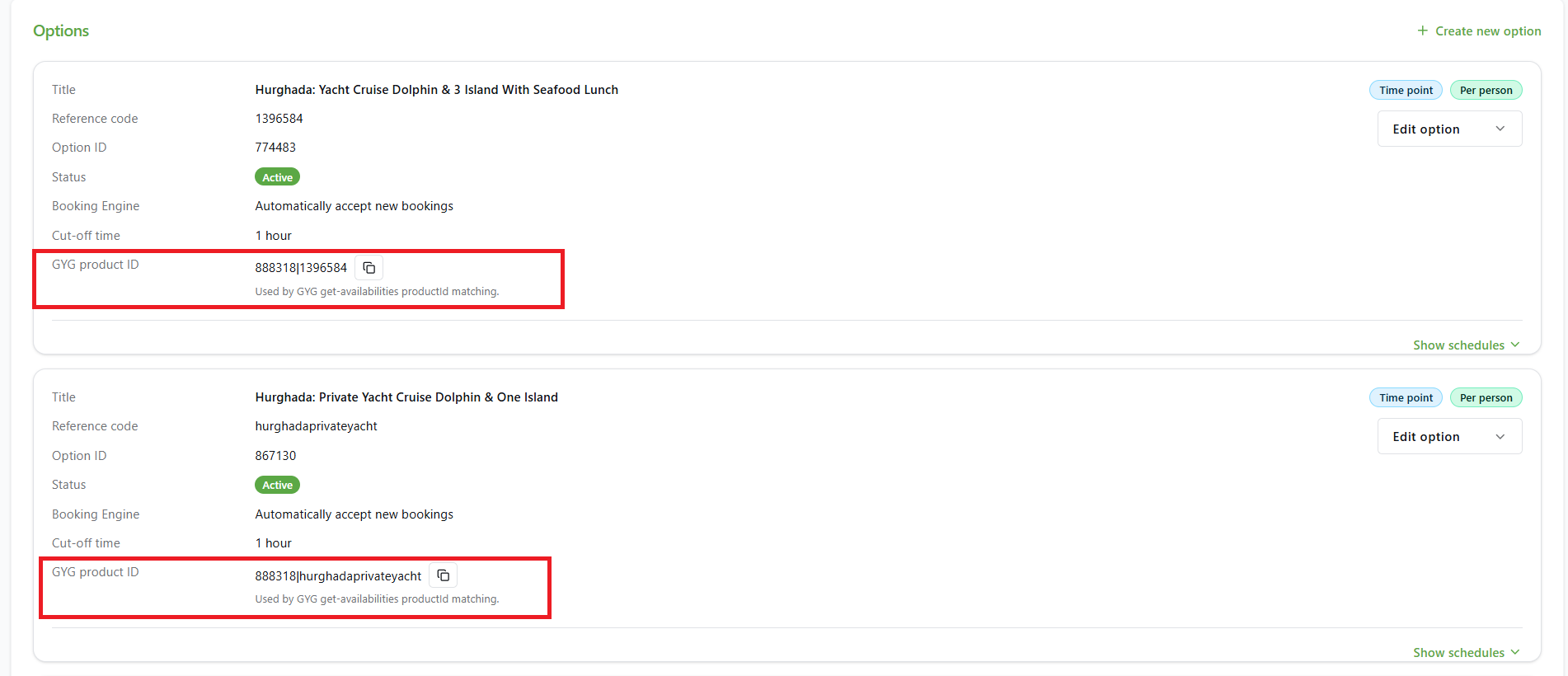
Where: In Go Shalabi admin, open your package’s Options. Each option card shows GYG product ID (with a copy icon).
What it looks like: 888318|1396584 or 888318|hurghadaprivateyacht — a base id, then |, then the same value as this option’s Reference code.
What happens next: Paste that full string into GetYourGuide when you map the product. GetYourGuide will then use it so bookings and availability match this option in Go Shalabi.
Contact & websites
Questions about mapping or your catalogue:
- goshalabi.com — main site
© Go Shalabi. This page is maintained for partner onboarding.